​​ Manufacturing BOM Software & Engineering Change Control — Vesonix TechLabs
Engineering The Next Vision
info@vesonix.com Hyderabad, India
Vesonix Apps

Manufacturing BOM
Flow

Manage BOM structures, revisions, and engineering change workflows — built to extend your existing ERP without replacing it.

Assembly Hierarchy — Manufacturing BOM Hover components for details
FGA
Finished Assembly
MFR
Mech. Frame
DRU
Drive Unit
CPL
Control Panel
STH
Steel Housing
MBR
Mnt. Bracket
FST
Fastener Kit
MTR
Motor Assy
GBX
Gear Box
PCB
PCB Board
DSP
Display
WRH
Wiring Harness
Type
Qty
Cost
Finished Assembly
Sub-Assembly
Component / Part

The Shift

The engineering change challenge — and how we solve it

See what breaks down in a typical BOM revision process and how Manufacturing BOM Flow fixes it.

Manufacturing BOM Flow — the problem
The Problem

Where Operations Break Down


  • In most manufacturing companies, the ERP holds the official BOM but the real change process lives outside it.
  • Engineering updates drawings and revises part numbers.
  • Production needs to know which version is valid.
  • Purchase teams order against older specs.
  • Quality requires evidence before approving a change.
  • Finance wants cost impact before release.
  • The result: BOM revisions tracked in spreadsheets, changes moving through email, drawings stored in shared folders with no clear latest version, and approvals completed outside any audit trail.
Manufacturing BOM Flow solution 1
Manufacturing BOM Flow solution 2
Manufacturing BOM Flow solution 3
Manufacturing BOM Flow solution 4
The Solution

How Manufacturing BOM Flow Solves It


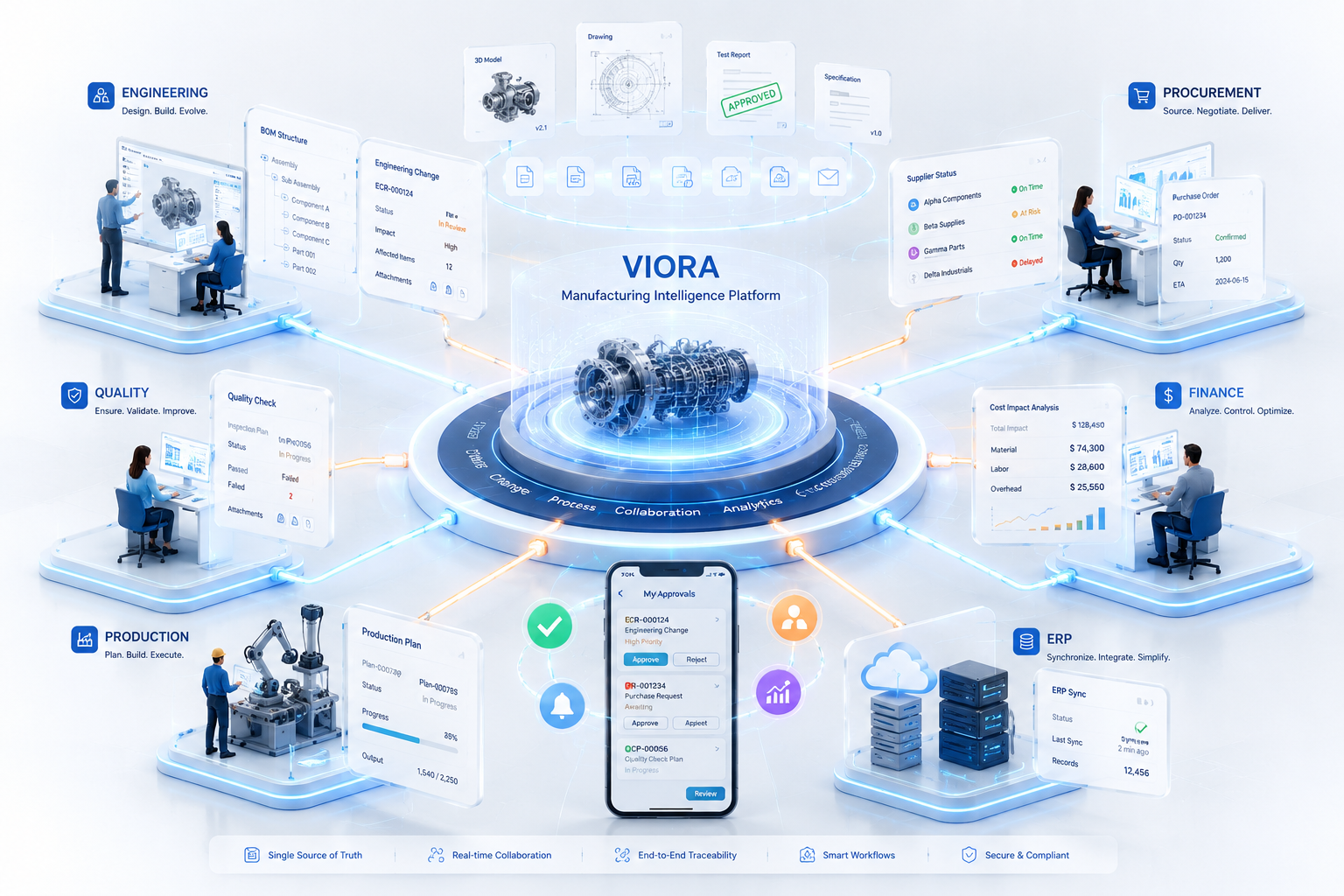
  • Your engineering, procurement, quality, and production teams get a controlled workspace around ERP BOM and item data.
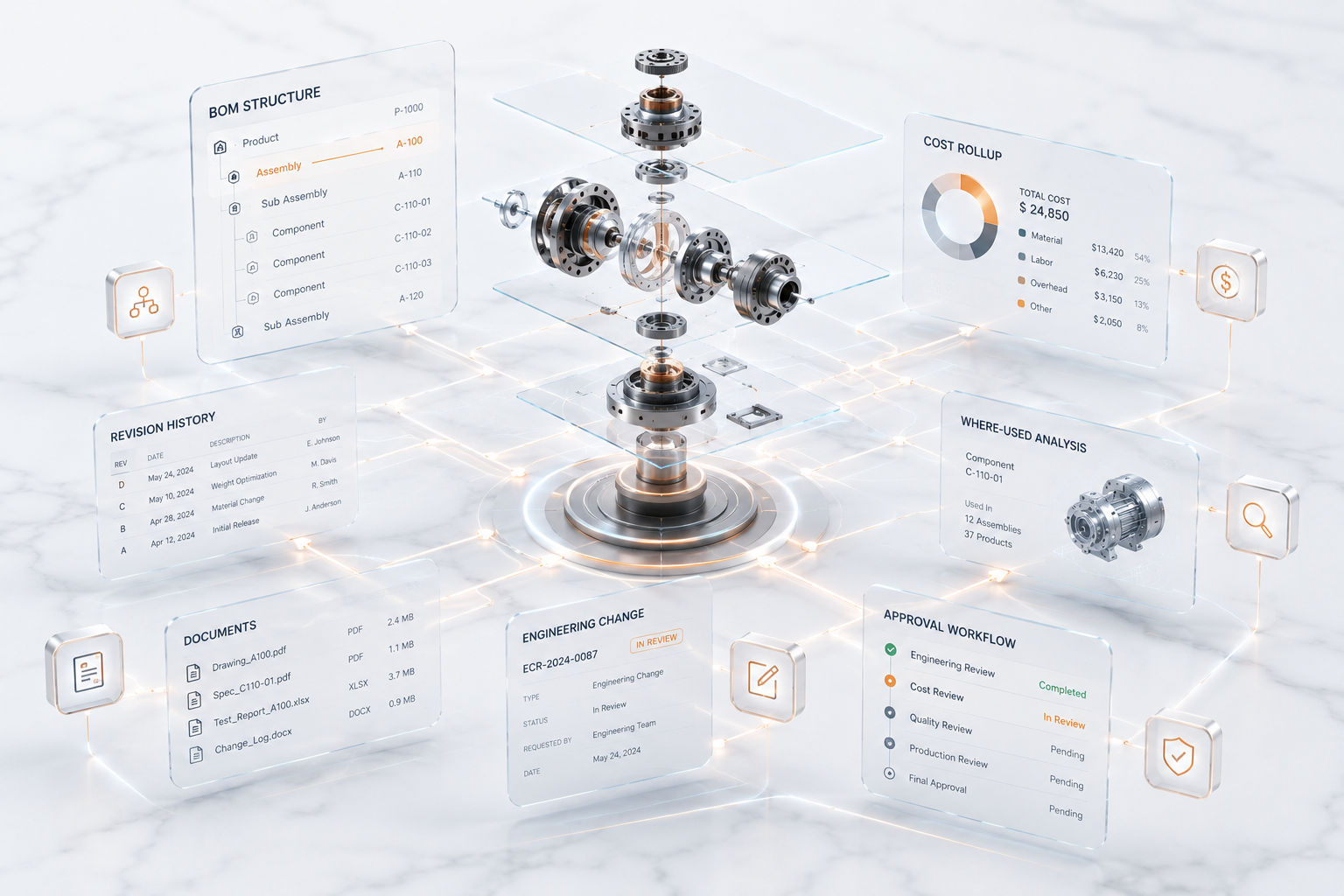
  • View BOM structures as a hierarchy, compare versions, run where-used analysis, and route engineering changes through defined approval stages.
  • Attach drawings and test reports, track cost impact, discuss at the record level, and assign tasks to the right people — without forcing every workflow into ERP customisation.

Capabilities

Every engineering change your team needs to control, built in

From BOM hierarchy to cost-impact review — one workspace for every change that touches your product.

01

BOM hierarchy explorer — view multi-level structures instead of flat ERP tables

02

Version comparison — see exactly what changed between BOM revisions

03

Where-used analysis — know every assembly impacted before replacing a component

04

Engineering change requests routed through configurable approval stages

05

Document attachments for drawings, specifications, test reports, and approval evidence

06

Cost rollup and material impact review before a change is released

ERP Integration

Your ERP holds the BOM.
This workspace controls what changes it.

No ERP replacement. A controlled engineering change layer that routes, reviews, and approves every revision before it touches the system of record.

Your ERP
System of record — stays exactly as it is
  • Item masters and part numbers
  • Bills of materials — flat and structured
  • Production orders and scheduling
  • Purchase orders and goods receipt
  • Inventory records and stock levels
Manufacturing BOM Flow adds
Controlled workflows, approvals, and decisions

Change Management Workflow

How changes move through the approval chain

Every engineering change request follows a defined sequence — reviewed, costed, quality-checked, and approved before reaching ERP.

01
Draft
02
Engineering Review
03
Costing Review
04
Quality Review
05
Production Approval
06
Released
07
Rejected
Stage 1 of 7
Draft

Change request created with reason, affected items, drawings, and target effective date. Visible to the requestor and their team.

01 / 07
Stage 2 of 7
Engineering Review

Engineering team reviews the proposed change, validates the replacement component, and confirms the BOM revision is correct.

02 / 07
Stage 3 of 7
Costing Review

Finance reviews the cost impact — estimated vs. actual material cost difference — before the change moves forward.

03 / 07
Stage 4 of 7
Quality Review

Quality team reviews test reports, inspection records, and approval evidence attached to the change request.

04 / 07
Stage 5 of 7
Production Approval

Production confirms material availability and readiness. Any open shortages or substitution approvals are resolved here.

05 / 07
Stage 6 of 7
Released

Change approved and ready for ERP update or integration. All comments, tasks, and documents are locked to the audit trail.

06 / 07
Stage 7 of 7
Rejected

Change declined at any review stage. Rejection reason is recorded and the request is returned to the originator for revision.

07 / 07

Getting Started

Up and running with Manufacturing BOM Flow
in three steps

No IT project. No drawn-out setup. Your engineering and operations team is live in weeks with a dedicated specialist guiding the way.

01
Book a Demo
Tell our team about your workflow. We'll walk you through the platform live and map it to how you operate — no commitment required.
Day 1
02
Configure Your Workspace
Add your team, set access roles, and import your data. Our onboarding specialists configure everything for your exact workflow.
Week 1
03
Go Live & Scale
Start operating on real data from day one. As your business grows, the platform scales with you.
Under 6 weeks
Live Walkthrough

A real BOM change, handled end to end

From identifying an affected component to releasing the approved change — here is how it moves through the workflow.

Step 01

Up Next

Application Preview

See the Interface

Explore the BOM hierarchy, change request workflow, and approval stages — before your team goes live.

Manufacturing BOM Flow screenshot 1
Manufacturing BOM Flow screenshot 2
Manufacturing BOM Flow screenshot 3
Manufacturing BOM Flow screenshot 4
Manufacturing BOM Flow screenshot 5
Manufacturing BOM Flow screenshot 6
Manufacturing BOM Flow screenshot 7
Manufacturing BOM Flow screenshot 8
Connected Solution

Meet Document Intake and Approval — built to make your team more productive

✈ Explore Solution
Explore Solution
★ Vesonix Module

Document Intake and Approval

Turn incoming documents into controlled business workflows — from capture and extraction through review, approval, and ERP handoff.

Document capture from email, upload, or integration
Field extraction using document intelligence (vendor, PO, amount, tax, dates)
Extraction confidence shown alongside the source document, before anything is trusted

Manufacturing Intelligence

Your BOM, your ERP, finally in sync

Give your engineering and manufacturing team a single source of truth for BOMs, change orders, and ERP data — without rebuilding your system.